

Scheduling for Microsoft Dynamics 365 Field Service
Enterprise scheduling for complex service organizations
Your technicians are qualified. Your work orders are in place. And still, every morning, one person under time pressure decides who drives where.
Microsoft Dynamics 365 Field Service provides the process foundation. SERVICE 1 provides the scheduling on top of it. Algorithmic, transparent and built for complex service assignments.


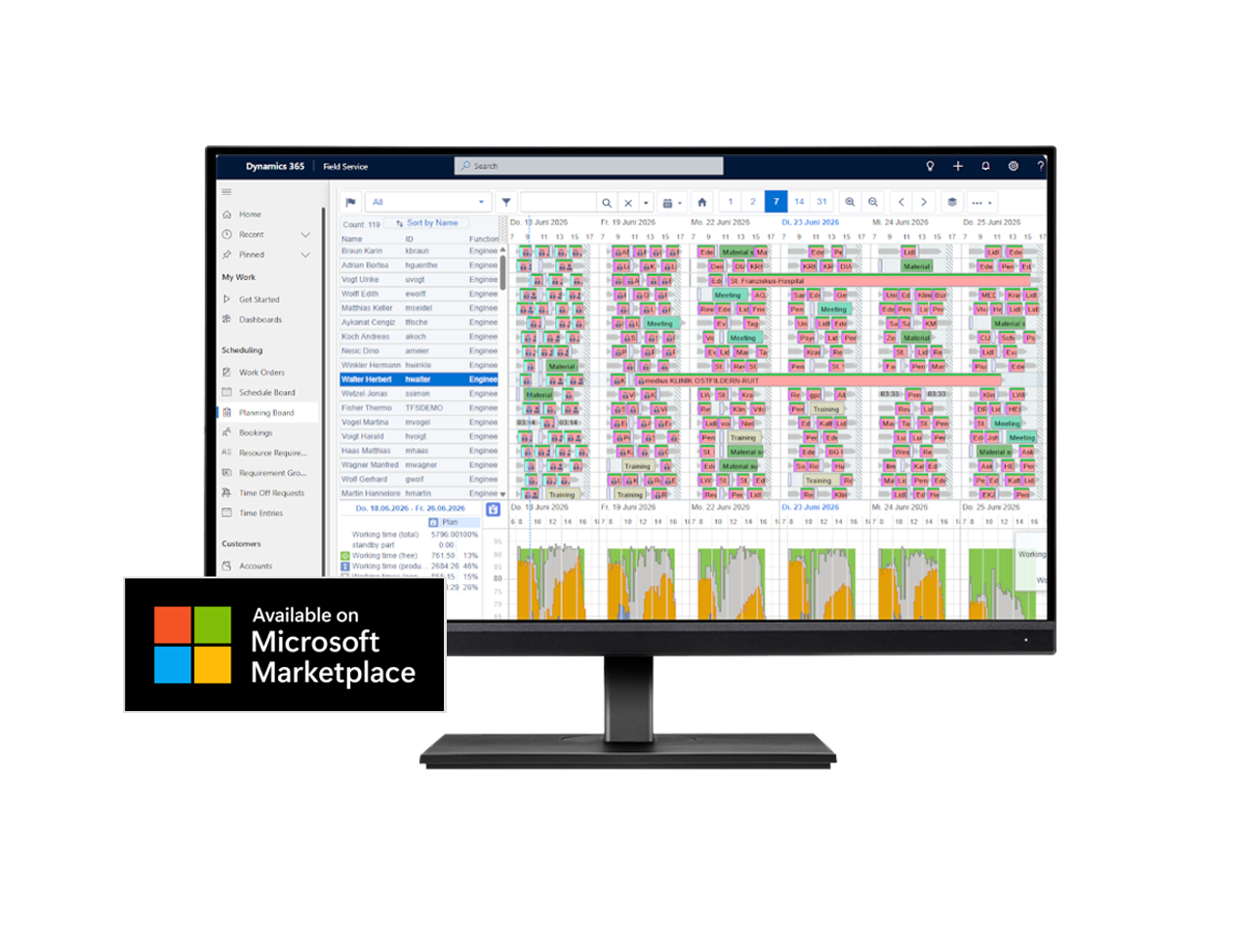
THE RIGHT PERSON. THE RIGHT JOB. THE RIGHT TIME.
Dynamics 365 provides structure.
SERVICE 1 takes care of scheduling.
Today, service contributes to margin. Maintenance contracts and service-level-based offerings create predictable revenue and retain customers. How much of it actually reaches the bottom line is decided in scheduling.
On-time performance, capacity utilization and travel time are the result of decisions that are still made by hand every morning, under time pressure. Microsoft Dynamics 365 Field Service forms the basis for consistent and transparent service processes.
The platform covers order management, asset and contract management, SLA tracking, resource and qualification management as well as mobile service processes. Dynamics provides structured processes. SERVICE 1 provides the algorithmic scheduling.
SERVICE 1 extends this platform wherever large service organizations need to dispatch and schedule with agility — from multi-day scheduling and short-notice rescheduling through to freely configurable views.
Higher first-time fix rate
The technician arrives with the right qualifications, the right tools and the part that is needed.
Shorter travel times
Routes are recalculated continuously and neighboring service orders are bundled.
Relief for your dispatchers
Routine service orders run automatically. The dispatcher manages strategy and exceptions.
More reliable appointments
Commitments that hold even when the day turns out differently than planned.
Why service is won or lost in dispatching
Scheduling decides the outcome before the technician sets off.
Sick leave, emergencies, service orders that overrun, delayed spare parts. A considerable share of the working day in dispatching goes into short-notice rescheduling. Manual and purely rule-based approaches only partly reflect the many simultaneous conditions behind a scheduling decision, and they do not scale with a growing service organization. Without algorithmic support, you stay in reactive mode.
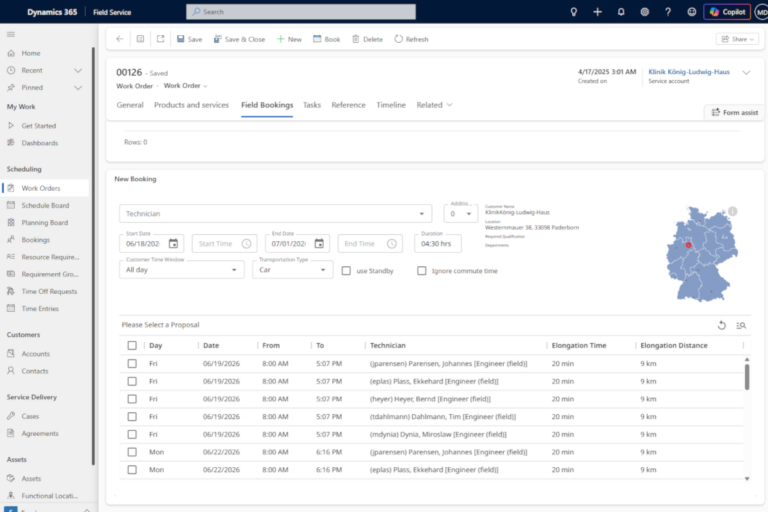
Five requirements that every scheduling solution has to be measured against.

Coordinate multi-day assignments reliably
A commissioning, a major maintenance project, a retrofit. Service orders like these take several days, involve multiple trades and are interdependent. Scheduling that only knows single-day appointments does not help here.

Custom dispatching logic for semi-automatic scheduling
Every service organization works differently. If further maintenance work is to be bundled into a single service order when a maintenance visit is scheduled, or repairs combined with maintenance, SERVICE 1 maps these rules and in doing so simplifies semi-automatic scheduling.

Take partners and subcontractors into account as capacity
Hardly any service organization works exclusively with its own technicians. If partners and subcontractors are not part of the same schedule, the result is duplicated work, follow-up queries and blind spots.

Keep day-to-day changes manageable
Sick leave, traffic jams, escalations. What matters is not whether the plan is right in the morning. What matters is how quickly it holds again in the afternoon.

Give customers a reliable way to book appointments
Someone who books a maintenance appointment at 11 p.m. and receives an immediate confirmation does not call the contact center the next day. Self-service is not a matter of convenience, it is a matter of taking load off your team.
Calculate. Verify. Decide.
Find out what your planning entails. During a one-on-one consultation, our experts will review your specific needs, challenges, and potential—and show you exactly what options are available for your planning.
Book your personalized consultation now and talk to our experts about your options.
SCHEDULING THAT ADAPTS TO YOUR DAY-TO-DAY OPERATIONS
Automatic where possible.
Assisted where it gets complex.
SERVICE 1 extends Dynamics 365 Field Service with a specialized solution for scheduling and resource allocation in complex service environments. The solution supports manual, assisted and automatic scheduling, taking service level requirements, location, duration, qualifications, capacities and spare parts availability as well as further parameters into account at the same time.
01
Manual scheduling
Full control for special cases. The planning board shows service orders, travel and break times alongside other activities such as training, illness and vacation in a Gantt chart. Dispatching is also possible directly in the map view.
02
Semi-automatic scheduling
The system suggests, the human decides. Based on qualification, capacity and distance, the dispatcher receives a selection of suitable technicians, with travel time and distance shown for each suggestion. Exclusion and weighting criteria are configurable.
03
Automatic scheduling
The requirements of the service order are checked against the available capacities. This produces a ranking of suitable technicians, scored according to your dispatching strategy. The service order goes to the technician with the highest score. At the same time, that technician’s route is recalculated, as are the routes of neighboring technicians.
Up to 80%
of service orders can be scheduled automatically. The remaining 20 percent stay where they belong: with the dispatcher.
How high that share is in your case depends on your service order mix. Organizations that mainly schedule multi-day projects involving several trades will deliberately sit below it, because the decision is better placed with a human there. That is exactly what the Proof of Value determines for your organization.
And on top of that: dynamic rescheduling in day-to-day operations
New priorities, delays or additional assignments feed directly into the schedule. If a technician drops out, a scheduling assistant redistributes their service orders while respecting the service levels you have committed to.
That keeps the schedule stable. Even when the day gets turbulent.
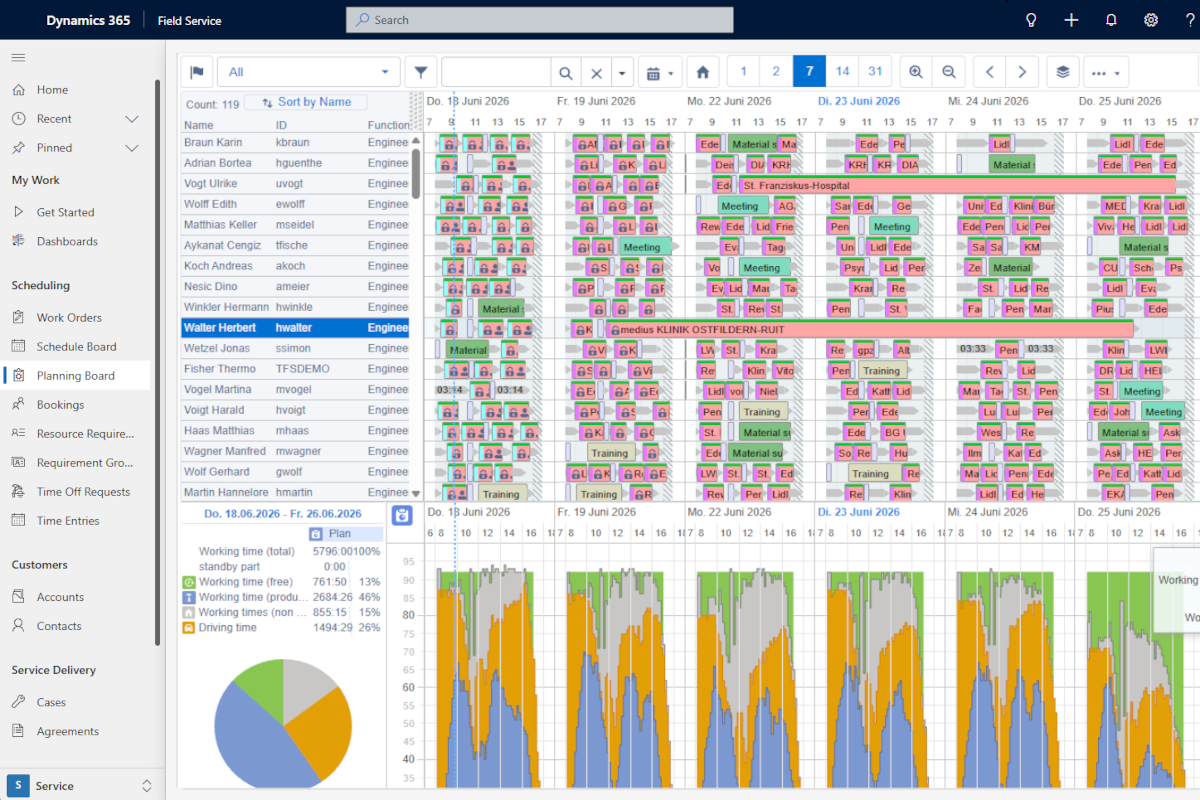
The planning board creates full transparency over capacity utilization, travel times and appointments, and makes sure resources are deployed to best effect.
Automatically generated appointment suggestions help find the right technician with minimal travel time.
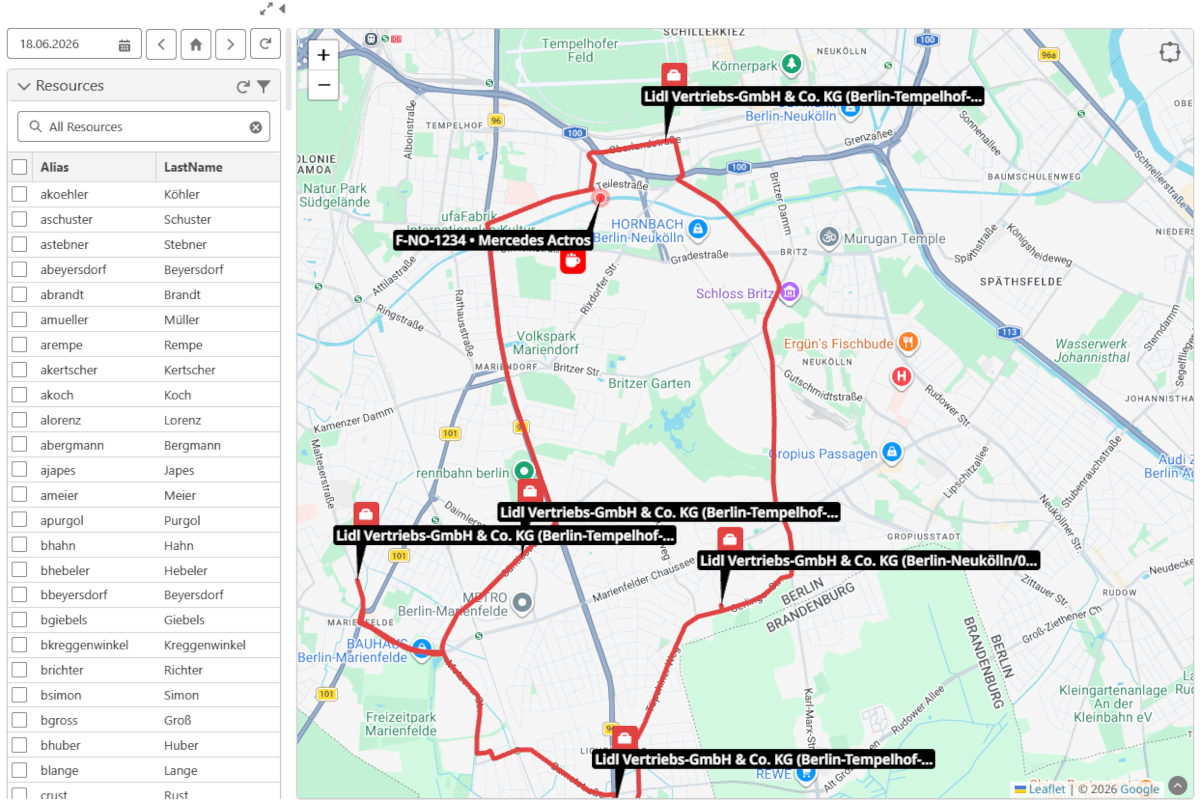
The map view visualizes service order locations and routes, in order to optimize routes and reduce travel times.
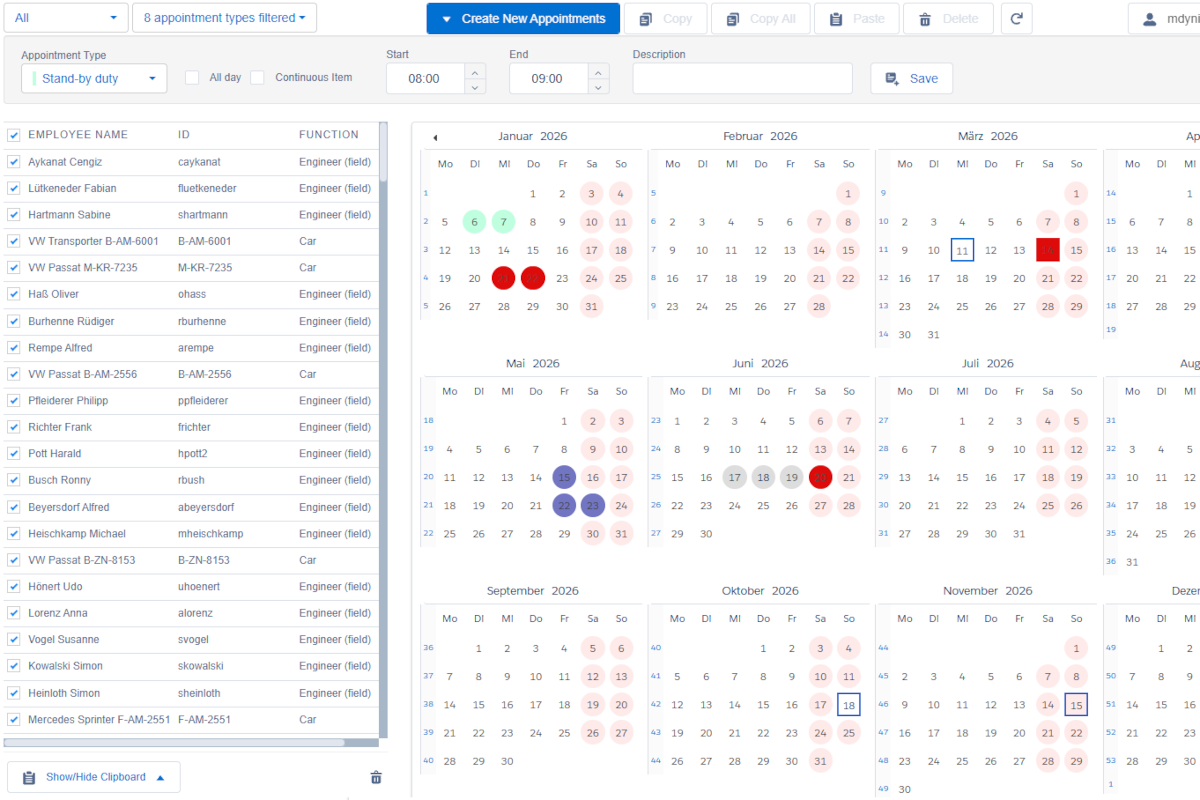
Central planning of resources and availability increases planning reliability in service.
Workaround. Customizing.
Or a standard product that fits.
Anyone mapping field service onto an enterprise platform has three options. Two of them keep costing you.
Option 1
Stay with the standard
Wherever functional coverage in service falls short, workarounds appear. The process adapts to the software, not the other way round. You feel that in day-to-day operations, every single day.
Option 2
Adapt the standard
Customizing closes the gap. In the short term. Whether you develop it yourself or your implementation partner does, what you end up with is a project, not a product. On top of that, you pay again for every adaptation with every release.
Option 3
Extend modularly
A standard product from a specialist extends the platform exactly where it reaches its limits. Your business processes stay consistent throughout. A product has a roadmap and fixed releases, and is developed further by all customers together.
What this option gives you
- Your business processes stay consistent across the entire company
- Future-proofing through standard products instead of organically grown in-house development
- Project reliability through specialists who do nothing but field service
- Compliance with your IT requirements through seamless integration into your existing landscape
It is not an either/or. You keep your Microsoft landscape and gain the depth of scheduling your service organization needs.
How you get there
Calculate first. Then decide.
You do not have to take our word for it. You can have it calculated first. Instead of a tool demo or a theoretical business case, we simulate real service scenarios using your historical service data.
01
Simulation
We run three scenarios using your historical service order data and compare them with your current scheduling. Travel time, distance driven, response time, service orders per technician.
Result: a report setting out your optimization potential, at a fixed price.
02
Proof of Value
Four weeks, three test runs, deep integration with your existing systems. Automatic dispatching runs against your real processes, not against a sample. No intervention in your systems, no risk.
Result: a documented return on investment and an action backlog.
03
Rollout
We start where the leverage is greatest and expand step by step to further teams, regions and service order types.
Result: scheduling that holds up in day-to-day operations.
Calculate. Verify. Decide.
Find out what your planning entails. During a one-on-one consultation, our experts will review your specific needs, challenges, and potential – and show you exactly what options are available for your planning.
Book your personalized consultation now and talk to our experts about your options.

Frequently asked questions
No. SERVICE 1 sits modularly on top of your existing Dynamics environment and is available via the Microsoft Marketplace. Service orders, assets and contracts stay where they are. What is added is the scheduling.
For large numbers of similar assignments with one technician per appointment, it is enough. The planning board and appointment suggestions cover that well. The standard reaches its limits where assignments run over several days, where several technicians work on one service order, or where the spare part determines the appointment. On top of that: automatic dispatching of larger service order volumes is not included in the standard. According to Microsoft, it has to be added at extra cost and is billed per optimized resource.
Because the bill arrives later. A customized standard has to be reworked with every release. A standard product brings its own further development with it, and responsibility for that stays with the vendor.
Two weeks for the simulation on your historical data. Four weeks for the Proof of Value in your real processes. Both at a fixed price, both before the licensing decision.
No. The three scheduling modes can be set per service order type. Recurring maintenance runs automatically, complex assignments stay with the human. The dispatcher manages strategy and exceptions instead of routine.
Yes. Partners and subcontractors are scheduled like your own capacity and dispatch their own technicians in the partner portal. You retain full visibility of status and appointments.
SERVICE 1 is certified to ISO 27001. For the simulation and the Proof of Value, technician data is processed in anonymized form.